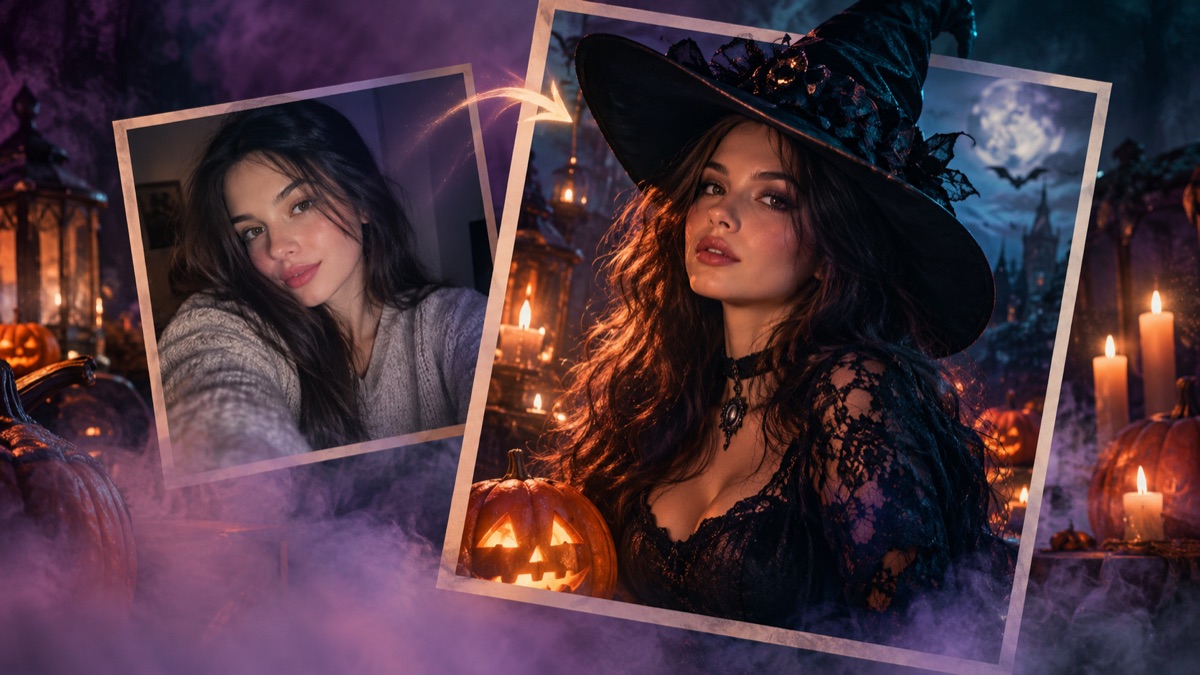
Start With the Right Selfie
The single biggest improvement you can make is not a better prompt. It is a better upload. A front-facing photo taken in soft daylight gives the model a clean read of your eyes, nose, jawline and skin tone. A dark club selfie with one coloured light gives it a guess. If the model has to guess, it will invent, and invention is exactly what makes an AI portrait stop looking like you.
Use a photo where your face is not covered by hair, a hat, sunglasses or a phone. Keep your expression neutral or slightly smiling; a strong expression is harder to preserve. A plain background helps the model separate your silhouette from the scene, but it is not mandatory. Avoid group photos and heavy beauty filters. The filter becomes the reference texture, and the model may reproduce the smoothed skin as if it were real.
- Face fully visible, eyes open, no strong shadow across the nose.
- At least 1000 pixels on the short side if you have it.
- One person only, unless you are using a couple preset.
- No screenshots of screenshots; compression artifacts become visible in the result.
- If you wear glasses, expect reflections to be preserved or removed unpredictably.
The Four-Part Prompt Structure
A reliable costume prompt has four jobs. First, it establishes the reference: use the uploaded photo as the primary source. Second, it protects identity: preserve facial proportions, skin tone, approximate age and natural anatomy. Third, it describes the change: hair, outfit, accessories, scene and lighting. Fourth, it forbids the common failures: extra limbs, duplicated fingers, altered identity, text, logos and watermarks.
Most public prompts only do the third job. They list a costume and a background, then hope the model keeps the face. It sometimes does, especially with a strong reference image, but the failure rate is much higher. The presets in this studio repeat the identity and negative constraints because repetition is cheap and the cost of a bad face is high.
| Prompt job | Example sentence | What it prevents |
|---|---|---|
| Reference | Use the uploaded photo as the primary reference. | The model inventing a new person from scratch. |
| Identity | Preserve facial proportions, skin tone and natural anatomy. | A costume that fits a stranger. |
| Transformation | Replace the outfit with a black velvet coat and silver collar. | A vague, generic costume. |
| Negative constraints | Avoid extra limbs, duplicated fingers, text and watermarks. | The most common visible artifacts. |
Which Model Should You Use?
At the time of writing, KIE lists GPT Image 2 at three credits for a 1K image, about one and a half cents at the standard rate. That is cheap enough to iterate. The model is good at instruction following, which matters more for costume edits than raw aesthetic quality. Nano Banana is also inexpensive and strong at edits, while Seedream and Flux Kontext sit at different price and quality points. The studio uses GPT Image 2 first and falls back to Nano Banana when the primary model is unavailable.
Do not choose a model by looking at a single hero image on a landing page. Run the same photo and the same prompt through two or three models and compare the face, the hands and the fabric. A model that produces a beautiful costume on a stranger's face is not useful if it changes your jawline. Consistency beats spectacle for this job.
Why Hands, Jewellery and Hair Break
Hands are hard because they have many small joints and the model has to invent a pose that matches the new outfit. If your original photo has hands in frame, the prompt may keep the gesture but lose a finger. The safest fix is a chest-up crop. If you need a full-body shot, generate at a larger size and check the hands before sharing.
Jewellery and hair accessories fail for a different reason: they are small, reflective and often overlap the face. A silver earring can merge with a jawline; a braid can eat an ear. Simplify the accessory, or ask for a closer crop. Hair is especially sensitive because it frames the face. If the hairstyle changes too much, the result reads as a different person even when the face is technically preserved.
Judging the Result Before You Post
Zoom in. Check the eyes for asymmetry, the teeth for extra rows, the ears for merging, the neck for impossible angles and the hands for missing fingers. Then zoom out and check the first impression. Does it look like a photo someone could have taken, or does it look like a painting of a costume? Both can be useful, but only one is convincing as a Halloween photo.
Compare the result with the original side by side. You are not looking for an exact match; makeup and lighting are allowed to change. You are looking for the same person under different styling. If a friend would recognize you without being told it is you, the identity constraint did its job.
- Eyes: same shape and spacing, no crossed pupils.
- Teeth: no extra rows, no blurred mouth.
- Ears and jawline: no melted edges or duplicated earrings.
- Hands: five fingers, natural joints, no second thumb.
- Background: no floating objects, no fake text, no brand logos.
What to Do When It Does Not Work
Change one variable at a time. If the face drifted, use a sharper photo before changing the prompt. If the costume is wrong, simplify the silhouette. If the background is chaotic, remove one atmospheric element. If the result is good but the crop is wrong, do not regenerate; crop the image in your phone's editor. Regeneration is expensive and unpredictable, while cropping is free.
The studio gives you two free image generations per day. Use the first one as a test, then decide whether the problem is the upload, the preset or the model. That is a faster path than burning ten generations on the same flawed input.
Frequently asked questions
Can AI make a Halloween costume photo without changing my face?
A well-written prompt can preserve the face in most cases, but no model guarantees it. A clear front-facing photo, a simple costume silhouette and explicit identity constraints give the best odds.
Is it legal to upload a photo of someone else?
Only with their permission. Do not upload photos of minors, identity documents or people who have not agreed to an AI edit.
How much does one image cost?
KIE listed GPT Image 2 at three credits for a 1K image at the time of writing, roughly one and a half cents at the standard rate. The studio's free daily allowance is funded separately.